
Lock, hide, password protect files and folders from unwanted access.
File Lock is a security software product that can restrict access to files and folders: lock files, folders and drives; hide files and folders to make them completely invisible; or password protect files and folders.
File Lock protects files and folders without altering those files and folders, your files won't have chance to be destroyed by it, and it will not slow down the system speed.
With the users, groups, and schedule options, you can specify different protection modes for different users, or at different dates and times.
With its easy-to-use user interface, you can easily protect any file or folder by dragging it to the main window of File Lock.
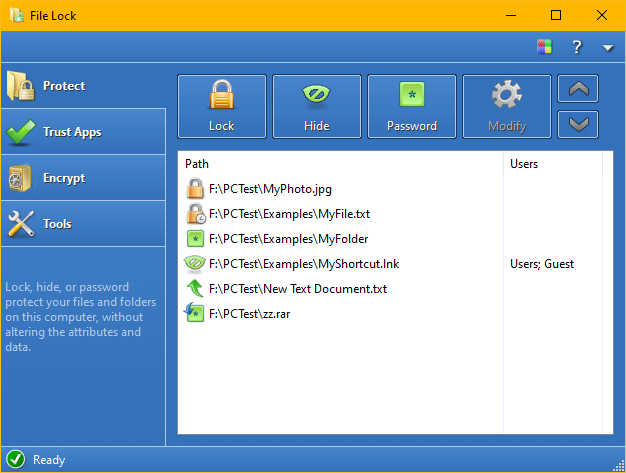

File Lock can hide your files and folders.
Once hidden, a file or folder becomes completely invisible to users and programs, just as if it were not there in the system.

A locked file or folder is visible to users, but none can read, write, modify, move, delete, or rename it.
Sub-folders and files in a locked folder are also protected.

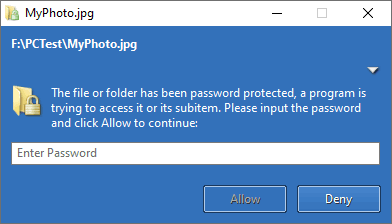
When trying to access a password-protected file/folder, the File Lock asks for the password to grant access.
And more protection modes are available:
When a folder is protected, sub-folders and files in that folder are all protected with the same protection mode.
With the following additional features provided by File Lock, a single file/folder can be protected in different ways for different users, or at different dates and times.
You can specify users and groups for a protected item, and then the protection will only be enabled for the users you have specified.
File Lock supports local users, local groups, domain users and domain groups.
You can use the schedule option to control when to protect a file or folder, daily, weekly or monthly.
Internet time can be enabled for schedule options, to avoid bypassing protection by changing system time.
Trust Apps, a.k.a. "Trusted programs", are programs that can always access the protected files and folders.
You can also set the users, groups and schedule options for trusted programs.
A single file or folder can be protected multiple times, each with different protection mode, users, schedule option etc. Thus, you can protect a file or folder in different ways for different users, at different hours, or both. Examples:
Download the fully-functional evaluation copy for free. Small size for downloading, easy to install and configure. You can uninstall it at any time if you no longer want to use it. Easy to uninstall and won't leave any junk.
Get File Lock to protect your files and folders. Your registration will be sent to you in a few minutes after you place an order.