
Use Desktop Lock to lock the system (desktop, mouse, keyboard, etc.) to prevent people from accessing your computer. This security product has helped many users protect their computers and control access to their computers.
Desktop Lock is a computer security protection and access control software product. You can use it to lock computer to prevent people from accessing your private documents and resources. When the computer is locked by Desktop Lock, no one can access your documents, browse your computer, or use programs on your computer.
You can lock your computer with one click, or let Desktop Lock automatically lock your system at any time or when system becomes idle. You can customize the appearance of the locked desktop with options provided by Desktop Lock. Desktop Lock also supports hotkey to lock the system.
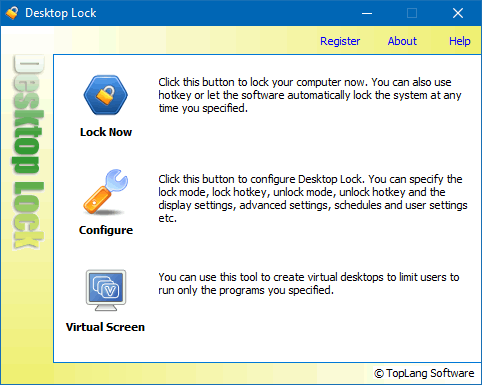
The default unlock hotkey is "h", if you haven't changed it after Desktop Lock was installed. Press this button on your keyboard to unlock the system, in case you locked your system without first configuring Desktop Lock.
Desktop Lock has been used by many users to help them protect their computers from unwanted access.

Keep people off your computer
Once the computer is locked by Desktop Lock, the keyboard and mouse will be totally unavailable. None can use your computer or access your private data.
People cannot unlock the system without the correct unlock hotkey and/or unlock password, and cannot terminate it with Task Manager. With its advanced features, it can keep locking even if someone forces a system restart.

Limit users to using only the program you specified
Desktop Lock can be configured to lock the system and launch a program or document, so that users can only use that specified program or document.
It also supports "Read-only" mode: users can only view the launched program or document, but cannot operate on it.

Customize the appearance of the locked desktop
With different lock modes, you can let Desktop Lock keep current contents of desktop, activate current screensaver, or clear the desktop and show a picture or video file.
You can customize the appearance of the locked desktop, such as background picture, banner, etc. You can also let it play audio or video media on the locked desktop.
You do not need to launch the main program and click the Lock Now button every time, there are various ways to lock the system:
 Lock hotkey
A lock hotkey can be used to lock the system without launching main program.
 Schedule options
Configure schedule options to lock system automatically at the hours you specified.
 Auto-lock when idle
Enable this feature to lock system when you are away from the computer.
Not only can it be set an unlock password, Desktop Lock also supports various unlock methods such as hotkeys, mouse actions etc. Only if users input the correct hotkey or mouse action, the system then will pop up the unlock password dialog box (or unlock the system directly if it wasn't set an unlock password).
 Unlock hotkey
It's NOT a common Windows hotkey. It can be any string such as your nickname, birthday, or any other characters combination.
 Mouse clicks
You can choose left button click, right button click or both left and right button down, and specify a repeat count, e.g. right-click 4 times.
 Mouse moved
Unlock the system when mouse moves as screensavers do. This unlock method should be used with an unlock password

Desktop Lock supports to unlock system with smart disks. A smart disk can be configured to:
Smart disks are not smart cards. They can be any kind of external disk or SD card. You don't need special devices to create them. Desktop Lock can convert a normal external disk to a smart disk, and the smart disk can still be used to save your files.
Some other features you may want to know about Desktop Lock:
 Leave messages on locked desktop.
 Lock and run screensaver.
 Paint on locked desktop.
 Internet time for schedule options.
 Multiple users support.
"Excellent software. I am glad there are people like you out there who write this type of software."
- Linda G Rebsamen
You can download and test the fully functional evaluation copy to see if Desktop Lock meets your needs. It's easy to install and can be uninstalled at any time, as long as you have the admin password, which was set by yourself (admin password protects Desktop Lock itself from changing configuration, and uninstalling).