Desktop Lock Express 2
Locks computer to prevent unwanted access:
- Restricts access to your computer by locking the keyboard, mouse and display.
- Provides major features of Desktop Lock, removed unnecessary options, decreased size.
- No install, no extra setup needed.
Desktop Lock Express is an access control software that can lock your screen
to prevent people from accessing your computer.
It is one of the Desktop Lock products family, which provides the major
features of Desktop Lock but decreased its size, removed unnecessary options.
Desktop Lock Express can be used directly without the need of installing,
all features have been included in the single exe file.
Desktop Lock Express can safely lock computer on Windows NT/2000/XP/2003/Vista
and later as well as all 64-bit Windows.
EASY
Locks your computer without the need of clicking "Lock" button.
Desktop Lock Express gives you the wonderful security experiences but has no
more settings bothering you:
- No Installation.
You don't need to install it, the single EXE file contains all the features.
You can download it and use it directly from anywhere.
- No Setup.
Although it provides options, you can use default settings.
The only thing you need to do is to set an unlock password to it the first time you launch it.
- No Clicking.
You launch the software, it locks the system, you don't need to click any button.
- Small Size.
The size of the Desktop Lock Express is only about 140 KB, it's easier to download and keep.
SAFE
Lock can not be bypassed by users.
Major features of the Desktop Lock have been included:
- Locks keyboard and mouse.
- Keeps locking if computer rebooted without being unlocked first.
- Supports to automatically lock the system after computer booted.
- Prevents computer from shutting down when system being locked.
- ...
No Ads, No spy ware and Trojans, and Virus-FREE, Get
Desktop Lock Express Now!

- Designed for Windows XP, Vista
- Designed for Windows NT, 2000, 2003, 2008
- Ready for all 64-bit Windows
How to Use
- Download DTLEP.zip, which contains the program
file of Desktop Lock Express, then extract the file to any of your private
folders. Or you can download the EXE file DTLEP.exe
directly.
- The first time you launch the Desktop Lock Express, it will prompt you to
specify an unlock password. Please set the unlock password to protect the
software, otherwise anyone can unlock the system. Once you have set the unlock
password, next time you launch the software it will lock the system with the
password directly. You can change the unlock password at any time by clicking
"Options" button then choosing "Change Unlock Password...".
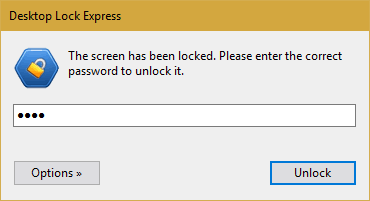
- To unlock the system, you enter the unlock password in the input box, then
click "Unlock".
- You can click the "Options" button to change the unlock password
and other options. Note you must enter the current unlock password first.
- You also can create a shortcut icon for the software and put it on to your
desktop, just right-click at the software, then choose "Send to"
-- "Desktop (Create shortcut)". a shortcut icon will then be put
on the desktop.
Please feel free to contact us for any question.
Download
Buy Now
|
Desktop Lock Express
Version: 2.1.0
Size: 133 KB
Platforms: Windows NT, 2000, XP, 2003, Vista
|