 If there is an old version of Password Door installed
on your computer, please uninstall it first.
Installing the new version directly over the existing version may cause problems.
If there is an old version of Password Door installed
on your computer, please uninstall it first.
Installing the new version directly over the existing version may cause problems.The following sections show the steps of using Password Door to protect programs on your computer.
If you have not downloaded and installed Password Door, you can download the latest version on our website, and install it onto your computer.
It is easy to install Password Door, basically you only need to specify an admin password, click the button "Next" several times in the setup wizard to complete the installation.
If there is an old version of Password Door installed
on your computer, please uninstall it first.
Installing the new version directly over the existing version may cause problems.
During installation, the Setup asks you to specify an admin password for Password Door. Admin password is very important and it is always highly recommended to use an admin password to protect the Password Door itself.
It's important to use an admin password to protect Password Door itself; otherwise anyone can access the Password Door main program to remove existing protection.
If you didn't set the admin password or if you want to change the admin password, you can click Change Admin Password in the main window of Password Door to change the admin password at any time.
Now you can start to protect programs on your computer.
There are various ways to protect a program, the Drag & Drop features are always recommended because it's much easier to protect programs quickly by using the drag & drop features:
 to any window to protect the target program.
Or you can protect a program in the classic way:
If the program is not in the list, you can click the browse button  to
browse and select the program (.exe) directly.
to
browse and select the program (.exe) directly.
The page "Protection item" with the information about the program shows after you protected a program, click OK to confirm the protection.
Before confirm the protection, you can also change the
protection mode, or set a
separate password to it.
For more information, see Various Ways to Protect Programs.
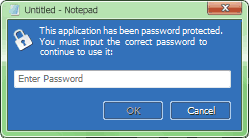
Once a program has been password protected, anyone who wants to run the protected program will be asked for password first.
Only if the correct password is inputted, the program then can continue, otherwise the user is not able to use the program and the program will be closed.
The password can be a separate password for the program only, or the admin password. Admin password always can be used to run all protected programs.
A program can also be directly denied by using
the protection mode "deny", users will not be able to
use the program and it won't give users the chance to input password to use the program.
Help Index | © TopLang software