The following sections introduce how to protect programs with Password Door and, how to use the settings in protection items to protect programs in different ways.
Password Door protects programs by using protection items. Protection items can be considered as rules. A protection item decides if users can use the target program, or will need to enter a password to start the program.
When you protect a program, you actually add a protection item to Password Door, so that Password Door will then know how to protect the program by checking the protection item.
When you protect a program, a new protection item will be created, you must confirm it by clicking OK to actually save it to Password Door.
Because advanced features such as filters, schedule options will cause a program being affected by multiple protection items, or multiple programs being affected by a single protection item, the order of the protection items matters.
To manage the existing protection items, Click View & Modify Protected Programs on the main window of Password Door.
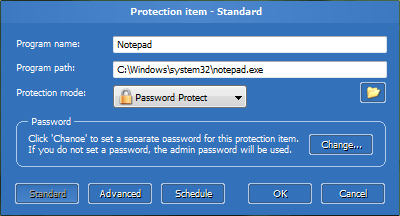
 Normally you only need to use the standard settings
to protect programs. The advanced settings and schedule options are for advanced usages only.
Normally you only need to use the standard settings
to protect programs. The advanced settings and schedule options are for advanced usages only.
It's easy to protect a program after you installed Password Door, there are various methods to add a program to be protected.
 to main window of any program to protect it
The target icon is on the top right of the main window. You can drag that icon to the main window of any program to protect the program the window belongs to.
This is the recommended method to protect a program, Password Door has the built-in intelligent to automatically use special settings for special programs. For examples the programs launched by rundll32.exe or dllhost.exe.
You can drag a program file (.exe) or a shortcut, to the main window of Password Door, then the program will be protected by Password Door.
Click Protect a Program on the main window of Password Door, then choose any item in the installed programs list, and then click Protect... to protect the program.
You can click Rescan installed programs... to let Password Door
search for installed programs on your computer again at any time.
Click Protect a Program on the main window of Password Door, then click the browse
button  to choose a program to protect.
A Protection item page with the program information is shown after you protected a program with any of the methods, you need to click OK to confirm the protection. Only if you confirm it, it then will be actually saved and take effect, otherwise the protection item will be dropped.
If you want, you can change the protection mode, or set a separate password to the protection item, or change any other settings, before you confirm the protection.
All protection items can be freely modified later.
By default, when you add a protection item to protect a program, the default protection mode is Password Protect, which means that the program will be password protected, anyone who tries to use the protected program will be asked for the password first.
The protection mode in a protection item can be changed, Password Door supports the following protection modes:
The protection item is disabled so that the Password Door will skip this item when checking for protection.
Normally this causes the protection of the target program being disabled. But if there are multiple protection items for the same program, the program can still be protected by other protection items.
This actually is not a protection mode, it is useful if you just want to disable the protection temporarily instead of removing it, so that you can reuse it later.
The target program in this protection item is allowed, it will not ask for password when a user tries to use it.
This mode acts as there is no protection for the target program, but it's useful when use advanced settings or schedule options.
The protected program will be denied directly without asking for password, users are not allowed to use the protected program.
This is the default protection mode, users will be asked for password first before they can use the protected program.
To modify the protection mode of existing protection items, click View & Manage Protected Programs on the main window of Password Door, then double-click at any of the items in the list of Protection manager to modify the protection item. In the protection item page, choose a protection mode in the drop down box.
For a password protected program, users must input the correct password to continue to use it.
By default the password is the admin password, which is the same password for protecting Password Door itself. The admin password is a master password which can always be used to start a password protected program.
If you don't want to share the admin password with other users, and still want them to be able to use the protected program on your computer, then you can set a separate password for the protection item. Users can use the separate password to start the target program.
If you use schedule options, the separate passwords for protection items are also useful if you want to use different passwords for a single program in different time range. You can, for example, use a protection item with password A to protect a program in between 7:00 AM to 5:00 PM, and use another protection item with password B to protect a program all other time. See also Using Multiple Protection Items and Using Schedule Options.
To set/modify the password for a protection item, click Change... then input the password twice and click OK to confirm.
Matrix password
is a new type of password in Password Door, you can use matrix password instead of the normal password
for any protection item.
A protection item can have a filter for advanced protection.
The filter is in the Advanced page of a protection item, it can be any string to filter the window class name, title and/or the file name, and supports wildcard.
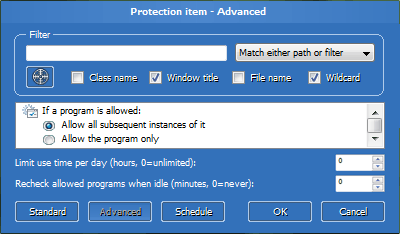
The icon on that page can be dragged to a window to get the filter.
Once you dragged and dropped it to a window, a popup menu shows to let you choose which filter you
want to use (the class name, window title or the file name).
In old version, the filter was called class name and window title.
In version 9, Password Door uses a single filter and it can be a class name, window title and/or
the file name depending on what you want it to be.
The filter logic right after the filter string decides how to use the filter:
You can use filter to protect a set of programs with one protection item, or exclude special situation while protecting a program, for example: *pad filters both Notepad and WordPad.
The check boxes under the filter, tell Password Door how to use the filter. Only if the option "Wildcard" is enabled, special characters (*, ?) are considered wildcard characters; otherwise they are only normal characters as the others.
Special limit for filtering windows title:
Password Door only filters the original title (caption) for a window. If the window changed its title after it was created, Password Door doesn't check the title again.
Notepad's original title was "Notepad", but it changes its title to "Untitled - Notepad" after it was launched, or "File name - Notepad" if you opened a text document with it. If you try to use a filter "Untitled - Notepad" to filter the title only, that will not work. You must use the original title "Notepad", or filter the class name, file name, or use wildcard filter such as "*Notepad".
Avoid using filters that only have wildcard characters,
such as *, *?*, ?*?, and so on, since a pure wildcard filter may affect ALL programs.
Password Door supports schedule options, you can set any program to be protected daily, weekly, monthly. For example you can set a program to be protected 9:00 AM to 4:00 PM every day, or set a program to be protected every Sunday.
To use schedule options, click Schedule in the protection item page.
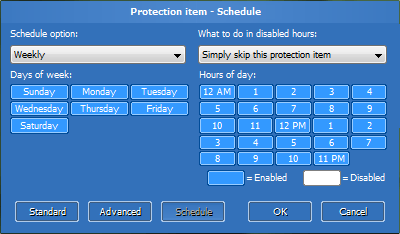
By default a protection item doesn't use schedule options, so it is "Always" in the schedule option drop box, which means the protection item will be always enabled. To use schedule options, you must first change it to Daily, Weekly or Monthly, and then you can select the days and the hours you want this protection item to be enabled at.
Schedule options can use internet time to avoid bypassing the protection by changing the system time, you can enable the internet time for schedule options in Advanced Settings.
The value in the "What to do in disabled hours" drop box is important, it tells Password Door what to do when the current time (day and hour) is not selected in this protection item:
This protection item will be simply skipped, as it is in disabled state. Password Door will simply skip this protection item and continue to check the next one.
If Password Door can not find another protection item that matches the target program, then the program will be allowed because none are protecting it.
The programs were allowed by this protection item, and are still running, will not be checked again so that they will be still allowed.
Password Door will skip this protection item, as it does when the above value is selected.
And, it will do an additional task: recheck the already allowed programs, to see if the allowed programs can still be allowed, or must be closed, or users need to input password again, depending on if it can find another protection item and the settings of that protection item.
See also Rechecking Allowed Programs.
The target program will be denied, no matter what the current protection mode is in this protection item. This is, newly launched instances of the program will be all denied.
The additional task will also be done: Password Door rechecks the already allowed programs, and because the protection is denied now, all running programs allowed by this protection item, will be closed.
This is useful because you can use it to allow a program only in the days and hours you selected, without the needs of using multiple protection items for a single program.
For example: if you want to allow notepad only in 9:00 AM, you normally need to use two protection items: one item allows notepad at 9:00 AM every day, and another item denies notepad all the time. With this value, you only need one single protection item to allow notepad at 9:00 AM.
See also Rechecking Allowed Programs.
Click on any day/hour to switch the selection, you also can click on one day/hour and hold the mouse button, then move mouse to change the selection for multiple days/hours (the selection state is decided by the first day/hour you clicked on).
A disabled day/hour disables the protection item,
It's NOT to disable (deny) the target program.
What Password Door will do in a disabled day/hour for a protection item,
depends on the option in "What to do in disabled hours".
Normally, one protection item protects one single program.
If you have read the section Using Filters, you already knew that by using filter, a single protection item can protect multiple programs.
On the other hand, multiple protection items can be added for protecting a single program, Password Door always allows you to do that. But if you don't use schedule options or advanced options, protecting a program multiple times is pointless.
This section explains why sometimes we need to use multiple protection items for one program and how those protection items work.
You actually do not need to use this technology in most cases, so do not use it unless you really need to.
Even when you plan to use schedule options, single protection item is already enough in most cases because there is the option "Deny and recheck allowed programs" in the schedule options can be used. See Using Schedule Options for details.
When will you need to use multiple protection items for one single program? When you want to use complex schedule options.
Important notice:
When use multiple protection items for a single program, those protection
items must be set the option "what to do in disabled hours" in schedule options, to
"Simply skip this protection item" or "Skip and recheck allowed programs",
so that the chain can be checked as designed.
Otherwise only the first protection item will be used and the program will be denied all other time.
Let's use an example: If you want a program to be allowed directly every Sunday, and to be password protected all other time, but you also want it to be fully blocked 9:00 PM - 8:00 AM every day.
The schedule options in a single protection item can not do that, there are 3 conditions, a single protection item can only take care two of them.
We can use 3 protection items to do that:
You may have noticed that the order of the protection items is important. In the example above, the program is blocked 9:00 PM to 8:00 AM every day, including the Sunday. This is because the highest protection item will be checked first.
If we use the protection items in a different order:
It's obvious that the program will be always allowed on every Sunday, even the time is in between 9:00 PM to 8:00 AM.
So once again, the order of protection items matters.
The name of the protection item. Password Door automatically specifies a name to each newly created protection item, you can change the name here. Name can be empty and the path will be used as the name.
The path to the target program. This is the most important information for a protection item, the path tells Password Door what the target program is.
Path can not be empty, or the protection item won't be saved. If you want to use filter to protect programs rather than the path, you can use a fake path such as "nopath", "Unknown", "Don't care" etc.
If you set a value greater than 0 (zero), this option is enabled and the users will only be allowed to use the target program for the time period you specified in a day.
If it reaches the max hours, then Password Door will recheck all the running instances of the allowed program, and terminate those instances after rechecked.
See also Rechecking Allowed Programs.
If the system is idle (this is, no mouse and keyboard inputs) for the time period you specified, Password Door rechecks the running programs allowed by this protection item.
If the protection mode is "Password Protect", then the allowed programs will ask for password again. It is possible that the protection for an allowed program has become "Deny" when the time it is being rechecked (You have changed the configuration or it now is affected by another protection item), it will be closed in this case.
See also Rechecking Allowed Programs.
These settings are in the list box of a protection item advanced settings page.
DO NOT change the following advanced settings if you don't know what they mean.
Password Door automatically uses special advanced settings for some programs, changing them may cause problems.
If a program has been allowed, then one of the following options tells Password Door what to do:
New instances of the same program can be freely launched as long as there is at least one instance running, Password Door will not ask for password for the program again.
If you closed all instances of the program, Password Door will ask for password again if you then try to launch the first instance of the program.
This is the default option, and is useful for programs like Internet Explorer: each time you open a new Internet Explorer window, the system creates a new instance of it, you don't want Password Door to ask for password for each of the instances since you have allowed one of them.
Treat every new instance of the program as a new program and check the protection for each of the instances, even there is already an allowed instance running.
Password Door checks the protection (and ask for password if the protection mode is "Password Protect") for the program every time you start a new instance of it.
New instances are not new windows,
most programs create new windows in the same instance; even there are many windows, there is
only one single instance for most programs.
So for most programs, the effect of this option is same to the default one above.
Password Door asks for password for each new created window. Internally, no entry will be saved to the internal database of Password Door, so each newly created window will be checked.
This is a replacement for the old option
Always ask for password.
A program will be denied if user can not provide the correct password, or the protection mode of the matched protection item has been set to be Deny. When the program is denied, one of the following options tells Password Door what to do:
Terminate the target program immediately, there is no chance to save data, the program will be closed directly.
Close the current window of the target program.
In most cases, closing the current window will cause the program to be terminated. For some programs (e.g. Windows Explorer, Outlook etc.), it will only close the window and will not terminate the whole program.
Terminate the target program and all running instances of the program immediately.
Only the running instances allowed by Password Door
will be closed. If an instance, for example, was launched before it was protected by Password Door, then
it will not be closed because Password Door doesn't have record on it.
When a password protected program is being launched, Password Door displays the password dialog box to ask for password to continue. Before it displays the password dialog box, it does additional tasks to the target program:
Password Door hides all windows of the target program, so that user can not see the content of the windows before provided the correct password. This option is enabled by default.
Password Door disables all windows of the target program, so that user can not access those windows before provided the correct password. This option is enabled by default.
Password Door suspends the program while asking for password, so that the program will stop working until user provides the correct password.
Use exe identity, which is always highly recommended. For more information, see EXE Identity.
Help Index | © TopLang software