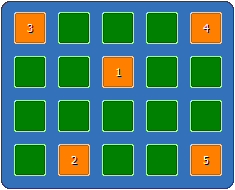
Matrix password is a new type of password in Password Door, it can be used for any of the protection items and/or the admin password, instead of the normal password.
When you change the admin password, or the password for a protection item, you can always click Set Matrix Password to switch to matrix password and define one.
You click some of the buttons to define a matrix password, the final matrix password is defined by:
Once a matrix password has been defined, when users try to input it to use a protected program, the same buttons must be clicked in the order exactly same to the order when you defined it.
In the example in this section, users must click the buttons in the order (row, column): (2, 3), (4, 2), (1, 1), (1, 5), (4, 5), to correctly input the matrix password.
 By default, the ordering numbers only will be
displayed when you define the matrix passwords; they won't be displayed when a protected program asks for the
matrix password and user clicks on the buttons.
By default, the ordering numbers only will be
displayed when you define the matrix passwords; they won't be displayed when a protected program asks for the
matrix password and user clicks on the buttons.
You can let it always show the ordering numbers by enabling the option "Display ordering numbers when input matrix password" in the global advance settings.
Every program file (.exe) is different to others, the exe identity (exe ID) is the checksum of a program file. With exe ID, Password Door can identify a program even if it was renamed or was moved to another location.
Exe ID is one of the key features of Password Door, it is always recommended to enable it for all protection items. Without this feature, users can simply break the protection by renaming the protected program, unless a filter is also used in the protection item.
The exe ID is enabled for every newly created protection item by default.
To enable/disable exe ID for a protection item, click Advanced in the protection item window, then scroll the tree view on the page, the last option in the tree view is "Enable exe identity".
Password Door can recheck the protection for already allowed programs, to decide if those programs can still be allowed.
Allowed programs will be rechecked if any of the following becomes true:
Once Password Door decides to recheck a program for protection, it first displays a countdown notification on the screen, users should save the current work with the program immediately.
Then after the countdown finished, it starts to recheck the protection. The program can be asked for password again if the protection mode for it is "Password Protect", or be terminated directly if the protection mode has been changed to "Deny", or allow the program to continue to be used if the program is allowed in the current settings.
In other words, Password Door checks the program again as for the first time the program was launched, but the current settings are used because the settings may have been changed after you allowed the program.
An allowed program can be terminated after rechecked, so users must save the current work before Password Door rechecks the program. Otherwise, users may lose data because they don't have chance to save the work once the rechecking progress begins.
Password Door supports multiple languages. To select a different language file, click Language on main window, then choose a language in the list, and click OK to activate it.
English Internal is not a language file,
it is the built-in, default language and can always be used even there is no any language file.
All language files are in the sub-folder Lang of Password Door installation folder, which normally is "C:\Program Files\Password Door\Lang".
After Password Door installed, there is only a language template English.ini. To create your own language file, duplicate the English.ini and rename the duplicated copy to a different name such as "French.ini", and then modify it. The key [Info]Name must be modified to tell the name of the new language file.
You are more than welcome to share your language file with other users. If you want to share your language file, send us a copy via email (as an attachment), and we will publish it on our website. You can download language files shared by other users on our website too.
To download existing language files or share yours:
http://www.toplang.com/mlang/
More information about creating language files:
The variable points to the key under the section.
The variable points to the key under current section or the [Global] section.
It first searches for the key under current section, then it searches for the same key under [Global] if it could not find one under current section.
This is a special variable which will always be replaced by the product name "Password Door".
This section shows how to use the feature "always ask for password".
If a program is password protected, it normally only asks for password for one time, once you have entered the correct password, it is allowed and will be always allowed until you close the program completely.
You don't want to be bothered to enter your password every time you open a new window in the program, since you have already allowed the program.
If you just want a program to always ask for password for each new window, that can be done by changing one of the advanced options of the protection item however.
In the Advanced page of a protection item, under the section "If a program is allowed:" in the tree view, you can choose "Always ask for password for each window ", then the target program will be always asked for password after you confirm the change.
The option only affects the "Password
Protect" protection items; and it won't affect the running programs, you must close all
allowed instances of the program for the option starting to work.
Most programs can be protected with the default settings of protection items without the need of any change. Only a few programs must be protected with different settings other than the default for better result.
You can change the settings of any protection item to try different settings combination and find out what settings are the best for those programs, but it will be much better if Password Door can do it automatically.
In order to handle the special programs, Password Door uses two methods:
When you drag the icon  to any window to protect the target program,
Password Door automatically checks the program and use best settings for the special
programs.
to any window to protect the target program,
Password Door automatically checks the program and use best settings for the special
programs.
For example, if a program is launched by rundll32.exe or dllhost.exe , the target program is not the rundll32.exe or dllhost.exe themselves, those are only the loaders. Password Door then will automatically add a filter to the protection item to protect the real target program.
This is built-in feature, you can not customize it, and it only works when you drag the icon to a window of target program, so using this drag and drop feature is always the most recommended method to protect a program.
There is this file PDSpec.ini in the program folder of Password Door after you installed it. The file contains the special settings about possible special programs we have found in our tests.
When you protect a program, the settings in that file are first checked and Password Door will automatically use those settings for the special programs to provide better protection.
You can customize that file to add your own special programs. With the help information about each setting in that file, it is not so hard to add new entries to the file.
The special settings will apply only when a new protection item is created, they will not be checked for existing protection items. If you change the settings of any existing protection item, even change the target program in the protection item, the special settings will not be checked again.
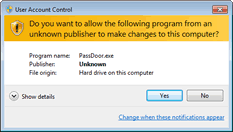
UAC (User Account Control) in Windows Vista/7 and later, forces any user account to be as limited account; even you have administrator right, you are still a limited user with UAC enabled. Thus, you don't have permission to write data to system registry database and folders, Windows will elevate your account and ask you to confirm when you need the administrator permissions (a.k.a. "Run as Administrator").
Password Door fully supports UAC, it won't need your account to be elevated as long as you use the main program under an administrator account (even the account is in limited mode).
Sometimes, if you use the main program under a standard account, or it could not save the configuration or registration code, it may ask elevating your account to save the data.
When this happens, please allow it to be run as administrator, Password Door will try to fix any problem, and the next time you use the main program, it won't need to be run as administrator anymore.
With the command line switches feature, which is described in the next section, you can backup your configuration, and restore it back to the Password Door later at any time.
The command line switch for backing up is /Backup=File name, and for restoring is /Restore=File name. You must also provide the admin password in the command line with /PWD=password.
"C:\Program Files\Password Door\PassDoor.exe" /Backup= "D:\My folder\My file.dat" /PWD="My password"
"C:\Program Files\Password Door\PassDoor.exe" /Restore= "D:\My folder\My file.dat" /PWD="My password"
See the following section for more information about the command line switches.
Password Door supports various command line switches, you can use the switches to control password protection, backup/restore the configuration, and so on. You can use those switches in a Command Prompt (cmd) window or use them in a command script (.bat or .cmd) file.
The switches should be used with the main program of Password Door (PassDoor.exe), for example:
"C:\Program Files\Password Door\PassDoor.exe" /Enable
If a switch has value, the value should be quoted when the value has space characters in it, for example, /PWD="password with space"
Command line switches:
This switch is an additional switch which normally should be provided in addition to other switches. Most of the other command line switches need the admin password to perform the task.
Important Note: The admin password in this switch, should be always the admin password in current configuration of Password Door.
Activate the protection. It is equal to clicking the "Activate Protection" on main window of Password Door.
This switch does NOT need admin password (/PWD).
Deactivate the protection.
If you use the switch as /Disable=Unload, it forces the kernel to be unloaded when the protection is deactivated, no matter if the advanced settings has the option "Unload kernel completely when deactivate" enabled or not.
If you use the switch as /Unload, then it is equal to clicking the "Deactivate Protection" on main window of Password Door.
When use this switch, the admin password must also be provided in /PWD.
Backup current configuration to the file you specified. The admin password must be provided in /PWD.
Restore the configuration backup file to Password Door. The admin password must be provided in /PWD.
When use this switch, the admin password provided with /PWD, is the admin password in the current configuration of Password Door, NOT the admin password in the configuration backup file.
These switches actually are used internally by the installer, but you can use them if you want.
/SetPass can be used to set a new admin password to Password Door, and /ScanPrograms can be used to let Password Door rescan installed programs, they all need the admin password in /PWD.
Help Index | © TopLang software